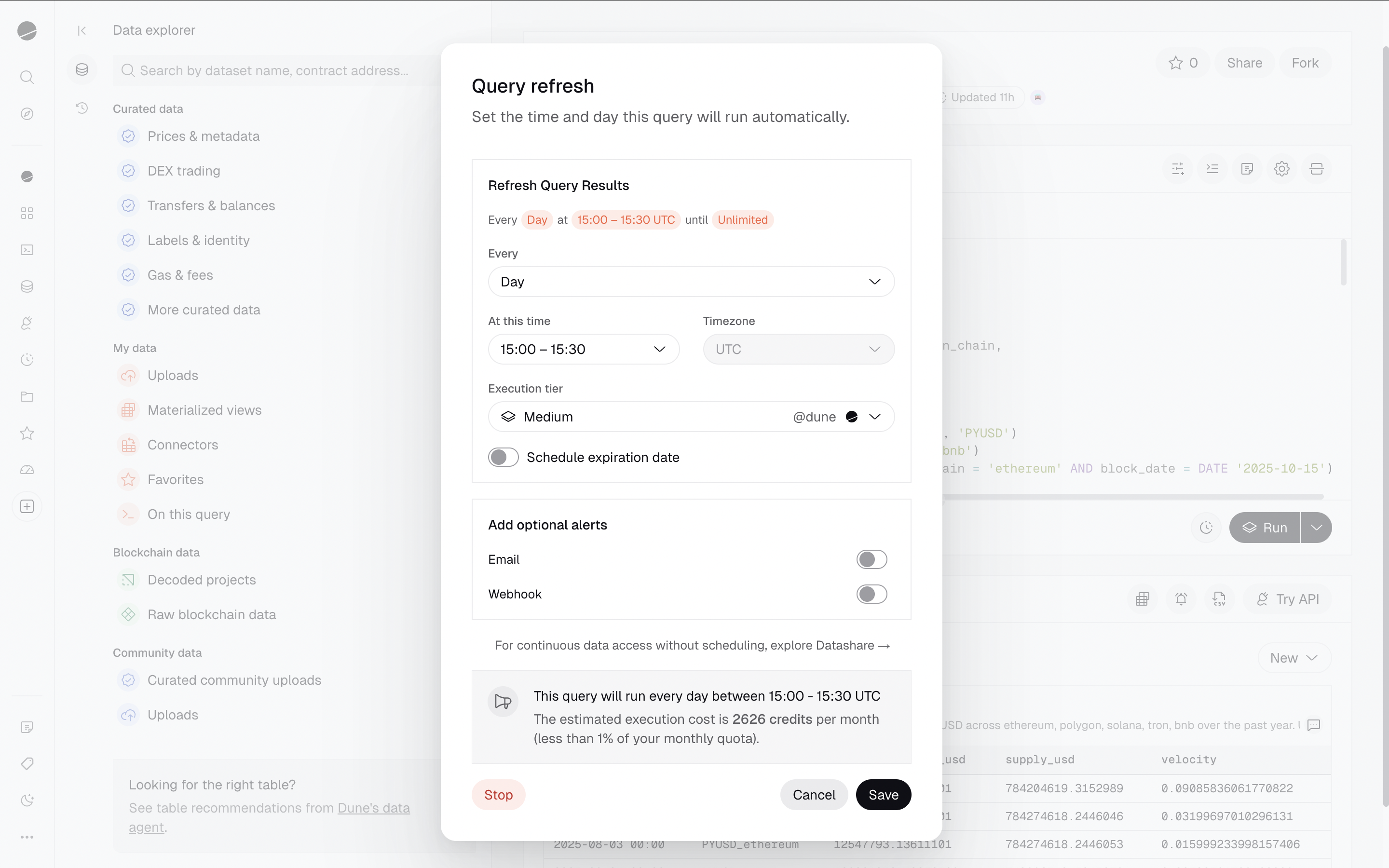
How to Schedule a Query
- Start by clicking the scheduler (clock) icon located at the bottom of the query editor, to the left of the “Run” button
- A dialog will prompt you to set a refresh schedule and an execution tier. Please note that scheduled queries can only be run on medium and large query engines, which will require credits.
- The dialog will display an estimated monthly credit consumption for this query scheduling, along with a monthly quota. These values will adjust based on the frequency and execution tier you select.
- Save the schedule
- Your query will execute once to start the schedule, and then will execute according to the schedule you set.
Query Scheduling Limitations
- Query scheduling is currently not available for queries with parameters.
- The query schedule is removed when the queries are archived or when the ownership changes (e.g., when a query is migrated).
- There are no notifications available for scheduled query failures as of now. Failed scheduled executions follow the same billing rules as other executions: SQL syntax/semantic errors, internal query-engine failures, and query-engine capacity-limit failures are not charged; timeouts or cancellations after compute was used may consume credits.
Adjusting or Cancelling a Query Schedule
To modify or cancel a query schedule, click the scheduler (clock) icon again to reopen the scheduling dialog. From there you can adjust the frequency, time, or execution tier. To stop the schedule entirely, scroll to the bottom of the dialog and click the Stop button.