> ## Documentation Index
> Fetch the complete documentation index at: https://docs.dune.com/llms.txt
> Use this file to discover all available pages before exploring further.
# Decoding FAQs
> Frequently asked questions about decoding contracts on Dune.
# Frequently Asked Questions
## General FAQs
There are two main ways to find out if your contract has been decoded.
First: Account Settings
Information on submitted contracts can be found in your account settings under "Contracts". The status of the contract will reflect one of the following:
1. Pending
2. Approved/Rejected\*
Note that once a contract has been approved, it takes around 24 hours for the data to be fully decoded and populated into our database.
\*If the contract is rejected, hover your mouse over the status to see the reason for the rejection.
Second: Our [Contract Decoding Dashboard](https://dune.com/dune/is-my-contract-decoded-yet-v2)
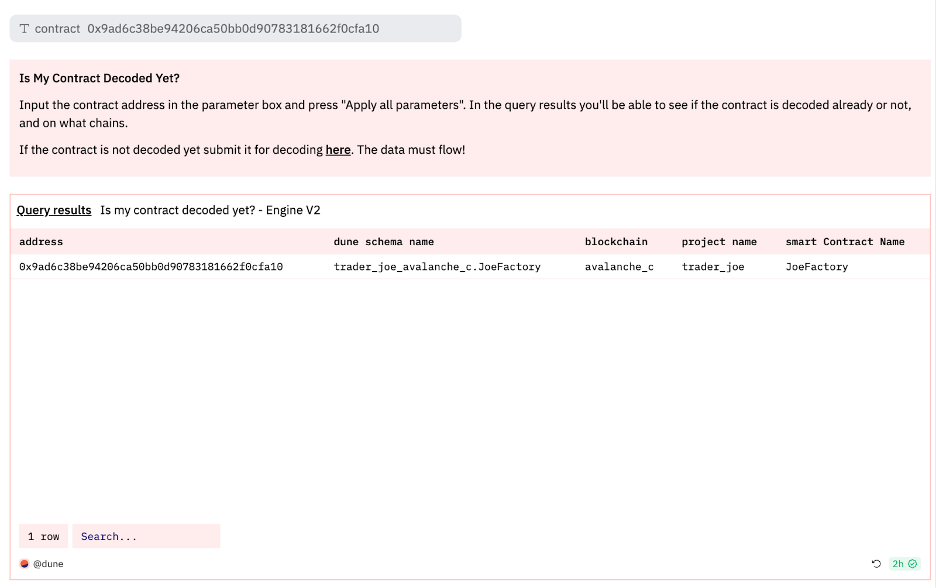 Built by our decoding team, this dashboard gives you information on the status of any submitted contract. Input the contract address in the box at the top of the dashboard and if the contract has been decoded, the contract information will populate the box along with where it is located in the Dune database.
Unfortunately, Dune only has access to contract data in circumstances that the contract performed an event that left a trace. Our recommendation is to check out the {blockchain}.traces table to see what information is available for a particular contract.
Alternatively, some contracts are upgradeable (ie., the smart contract code can be modified). In this case we may not have all of the ABIs. ABIs can be checked in the ABI column of the {blockchain}.contracts tables. A contract can always be resubmitted with missing ABIs so we can update our data.
If the contract being manually submitted is a Proxy contract, we recommend you to move on to the next section.
Although we try to fetch contract information such as the ABI, sometimes this information might not be available through our sources.
In those instances, you will need to manually input the contract's name and its ABI.
If the contract has been verified by the chain's block explorer, you should be able to find this information there.
In order to properly decode transactions for contracts that fit the [Proxy pattern](https://blog.openzeppelin.com/proxy-patterns/), Dune needs to map the Proxy contract's address with the implementation contract's ABI.
We avoid monitoring the implementation contract's address because its logic is accessed in transactions via the [`DelegateCall` function](https://medium.com/coinmonks/delegatecall-calling-another-contract-function-in-solidity-b579f804178c).
If we did monitor the implementation contract's address directly, we would miss out on any event logs in its logic since these are actually fired by the caller (the Proxy in this case) when calling a function through `DelegateCall`.
When submitting Proxy-patterned contracts to Dune, you should input the Proxy contract's address and, if you have it, the Implementation contract's ABI. If the Proxy has a new implementation upgraded that you wish to decode, use the same project name + contract name and select 'NO' for several instances!
Built by our decoding team, this dashboard gives you information on the status of any submitted contract. Input the contract address in the box at the top of the dashboard and if the contract has been decoded, the contract information will populate the box along with where it is located in the Dune database.
Unfortunately, Dune only has access to contract data in circumstances that the contract performed an event that left a trace. Our recommendation is to check out the {blockchain}.traces table to see what information is available for a particular contract.
Alternatively, some contracts are upgradeable (ie., the smart contract code can be modified). In this case we may not have all of the ABIs. ABIs can be checked in the ABI column of the {blockchain}.contracts tables. A contract can always be resubmitted with missing ABIs so we can update our data.
If the contract being manually submitted is a Proxy contract, we recommend you to move on to the next section.
Although we try to fetch contract information such as the ABI, sometimes this information might not be available through our sources.
In those instances, you will need to manually input the contract's name and its ABI.
If the contract has been verified by the chain's block explorer, you should be able to find this information there.
In order to properly decode transactions for contracts that fit the [Proxy pattern](https://blog.openzeppelin.com/proxy-patterns/), Dune needs to map the Proxy contract's address with the implementation contract's ABI.
We avoid monitoring the implementation contract's address because its logic is accessed in transactions via the [`DelegateCall` function](https://medium.com/coinmonks/delegatecall-calling-another-contract-function-in-solidity-b579f804178c).
If we did monitor the implementation contract's address directly, we would miss out on any event logs in its logic since these are actually fired by the caller (the Proxy in this case) when calling a function through `DelegateCall`.
When submitting Proxy-patterned contracts to Dune, you should input the Proxy contract's address and, if you have it, the Implementation contract's ABI. If the Proxy has a new implementation upgraded that you wish to decode, use the same project name + contract name and select 'NO' for several instances!
 When you submit the Proxy contract's address, we'll attempt to fetch the proxy's contract name and the implementation address it's pointing towards to source the Implementation contract's ABI.
If we can't find the Implementation contract's ABI, you'll need to find it using the relevant chain's blockchain explorer and input it manually.
You can use the [Etherscan Proxy Contract Checker](https://etherscan.io/proxyContractChecker) to help verify and link proxy contracts with their implementation ABIs.
Similar to vanilla Proxy contracts, [EIP-2535](https://eips.ethereum.org/EIPS/eip-2535) contracts can be supported by passing in the address of the Diamond Proxy as well as **a single ABI representing the totality of all the facets interfaces**.
The most common reason that your submission got rejected is because it has already been decoded! You can make use of [this dashboard](https://dune.com/dune/is-my-contract-decoded-yet-v2) to check whether the contract have been decoded.
**Enter the contract that you wish to decode and hit enter to run:**
When you submit the Proxy contract's address, we'll attempt to fetch the proxy's contract name and the implementation address it's pointing towards to source the Implementation contract's ABI.
If we can't find the Implementation contract's ABI, you'll need to find it using the relevant chain's blockchain explorer and input it manually.
You can use the [Etherscan Proxy Contract Checker](https://etherscan.io/proxyContractChecker) to help verify and link proxy contracts with their implementation ABIs.
Similar to vanilla Proxy contracts, [EIP-2535](https://eips.ethereum.org/EIPS/eip-2535) contracts can be supported by passing in the address of the Diamond Proxy as well as **a single ABI representing the totality of all the facets interfaces**.
The most common reason that your submission got rejected is because it has already been decoded! You can make use of [this dashboard](https://dune.com/dune/is-my-contract-decoded-yet-v2) to check whether the contract have been decoded.
**Enter the contract that you wish to decode and hit enter to run:**
 **Viewing results:**
 If you see results after running the query, that means the contract is already decoded! You'll be able to find the decoded tables under 'Decoded Projects' in the data explorer.
In the interest of data quality, we reject duplicative, incorrect or low quality submissions. To avoid rejection, be sure to submit accurate contract information! Submissions can be rejected for a number of reasons, including not following the naming conventions, not providing clear data at submission, etc. The particular reason for a contract submission being rejected can be found in account settings under "Contracts" by hovering the mouse over the "Rejected" status.
It may take up to six hours from the time of contract approval for the contract to be fully decoded along with its historical data. If you still can't see the data after this period, please reach out to us through our [#decoding Discord channel](https://discord.com/channels/757637422384283659/850326962152538122).
Need some data urgently but the contract have yet to be fully decoded? You can refer to these queries that utilizes the logs table to get the events:
* [Querying Synthetix's PerpsTracking Event](https://dune.com/queries/2743182)
* [Querying USDT's AddedBlackList Event](https://dune.com/queries/3250843)
## Duplicate Data & Namespace Issues
This happens when the same contract is submitted multiple times under different names, across different blockchains. To resolve:
1. **Identify the duplicate submissions** in your contracts list
2. **Choose which namespace to keep** (e.g., LiFiDiamond\_v2 vs LiFiDiamond)
3. **Resubmit the contract** and select "Rename a contract" as the reason for resubmission
!\[Resubmission UI example]\(/web-app/images/alerts/Contract resubmission sc.png)
4. **Contact Dune support** via Slack (For Enterprise Customers), Telegram (Paid Customers), [Discord](https://discord.com/invite/ErrzwBz), or email ([support@dune.com](mailto:support@dune.com)) to remove the duplicate namespace
**Going forward: Before submitting, [search](https://dune.com/dune/is-my-contract-decoded-yet-v2) if the contract already exists under your project**
To prevent this:
* Check existing decoded contracts before submitting
* Use consistent naming conventions across your team
* Document which contracts are already decoded
**No**, you cannot move contracts between namespaces after decoding. You would need to:
1. Resubmit under the correct namespace
2. Wait for new decoding to complete
3. Migrate your queries to use the new tables
4. Submit a request to Dune support via Slack (For Enterprise Customers), Telegram (Paid Customers), [Discord](https://discord.com/invite/ErrzwBz), or email ([support@dune.com](mailto:support@dune.com)) to remove the old namespace
**Plan your namespace structure carefully before submission.**
## Rejection & Missing Data Issues
When a contract is rejected without a detailed explanation, it's often for one of these common reasons:
* **Duplicate submission**: Contract is already decoded under another name
* **Invalid ABI**: ABI doesn't match the deployed bytecode
* **Wrong contract type**: Submitted a library or abstract contract
To debug: Find a specific transaction hash where your event/function was called and include it in your resubmission notes.
Dune only displays functions and events that have actual onchain data:
✅ **Visible**: Events/functions that have been called at least once\
❌ **Hidden**: Events/functions with zero onchain activity\
❌ **Hidden**: View/pure functions (read-only, no on-chain traces)
**Most common cause**: This often happens when a proxy contract's implementation is upgraded. The new functions/events won't appear until:
1. They're actually called onchain, AND
2. The new ABI is submitted to Dune for decoding (requires manual approval, which can take some time)
**To verify**:
1. Find a transaction that calls the missing function/event
2. Check if it appears in `ethereum.traces` or `ethereum.logs` raw tables
**To check**:
```sql theme={null}
-- Check if tx hash exists in traces
SELECT
'traces' as table_name,
COUNT(*) as record_count
FROM ethereum.traces
WHERE tx_hash = 0x1234567890abcdef1234567890abcdef1234567890abcdef1234567890abcdef;
```
OR
```sql theme={null}
-- Check if tx hash exists in logs
SELECT
'logs' as table_name,
COUNT(*) as record_count
FROM ethereum.logs
WHERE tx_hash = 0x1234567890abcdef1234567890abcdef1234567890abcdef1234567890abcdef;
```
If yes but not in decoded tables, contact Dune support with the tx hash
## Bytecode Matching & Instance Detection
**Bytecode matching timeline**:
* **Initial contract**: Typically decodes within 24 hours
* **Bytecode matching scan**: Additional 24-48 hours
* **Status remains "Pending"**: This is normal during scanning
* **All instances appear**: Usually within 48-72 hours total
**To verify it's working**:
```sql theme={null}
-- Check if other instances are detected
SELECT DISTINCT contract_address
FROM namespace.contractname_evt_YourEvent
```
If after 72 hours only one address appears, verify:
* Other contracts have 100% identical bytecode
* You enabled "bytecode matching" during submission
* Contracts aren't variations (even slight differences prevent matching)
After decoding completes, you can check:
1. **Query the decoded tables for multiple contract addresses**
2. **Can use [dune.com/agent](https://dune.com/agent)**:
```sql theme={null}
-- Find all contracts with the same bytecode as a specific contract
SELECT *
FROM contracts.contract_mapping
WHERE code = (
SELECT code
FROM contracts.contract_mapping
WHERE contract_address = 0x7ac96180C4d6b2A328D3a19ac059D0E7Fc3C6d41
AND blockchain = 'ethereum' -- or your target chain
)
ORDER BY code_deploy_rank_by_chain, created_time
```
## Complex Namespace Management
You cannot selectively include/exclude contracts with bytecode matching. Options:
**If contracts should be in different namespaces**:
* Submit them separately
* Don't enable bytecode matching
* Manually submit each address
**If you need selective grouping**:
* Submit the main contract with bytecode matching
* Create a view filtering only desired addresses:
```sql theme={null}
CREATE VIEW my_filtered_events AS
SELECT * FROM namespace.contract_evt_Event
WHERE contract_address IN (
'0xAddress1',
'0xAddress2'
)
```
**For different versions under same namespace**:
* For upgradeable contracts (e.g., proxy pattern), submit only the proxy contract address with the current implementation's ABI.
* Use the same project and contract names for consistency.
* When a new implementation is deployed, resubmit the proxy contract with the updated ABI and the same names (select 'NO' for several instances).
* Do not submit multiple versions as separate contracts; just update the ABI as needed via resubmission.
**Best practices for shared contract code**:
* **Coordinate namespace ownership**: Decide who "owns" the namespace
* **Use project-specific namespaces**: teamA\_token vs teamB\_token
* **Create cross-project views**: Combine data post-decoding
* **Document deployment addresses**: Maintain a registry of who deployed what
**Note**: Dune cannot always determine exactly what onchain data passes through a given project. This limitation applies broadly, but is especially relevant for aggregators, interfaces, or infrastructure layers that interact with data indirectly. As a result, usage and attribution metrics may be incomplete or ambiguous.
## Performance & Query Optimization
**Optimize your queries by**:
**Filter early and specifically**:
```sql theme={null}
-- Good: Filter by contract_address first
SELECT * FROM uniswap_v2.Pair_evt_Swap
WHERE contract_address = 0xSpecificPair
AND evt_block_time > now() - interval '1 day'
-- Bad: Scan all pairs first
SELECT * FROM uniswap_v2.Pair_evt_Swap
WHERE evt_block_time > now() - interval '1 day'
AND token0 = 0xSpecificToken
```
**Identify relevant contracts upfront**:
* Before querying, determine which token pairs or contract instances matter to your analysis
* You can do this by:
* Looking them up on a block explorer or the project's official documentation/site
* Querying Dune itself to find pairs involving a specific token of interest
* Use materialized views for common filters
* Partition by time when querying historical data
* Index on contract\_address in downstream tables
**Use these strategies**:
**Create a contract registry view**:
```sql theme={null}
WITH my_protocol_contracts AS (
SELECT
contract_address,
MIN(evt_block_time) as first_seen,
COUNT(*) as event_count
FROM uniswap_v2_multichain.uniswapv2factory_evt_paircreated
GROUP BY contract_address
)
SELECT * FROM my_protocol_contracts
ORDER BY event_count DESC
```
* Use Dune's search in Data Explorer with specific addresses
* Filter by deployment block for newer contracts
* Maintain an off-chain registry of your contract deployments
## Special Cases & Edge Scenarios
**For deterministic deployments**:
* Submit once per chain (multichain decoding handles this automatically if criteria are met)
* Use consistent naming across all chains
* Note in submission: "CREATE2 deterministic deployment"
**Query efficiently**:
```sql theme={null}
-- Query all chains at once
SELECT * FROM namespace.contract_evt_Event
WHERE chain IN ('ethereum', 'polygon', 'arbitrum')
```
## Submission-Related FAQs
You'll need to resubmit the contract with the correct implementation ABI. Use the resubmission process and select "Upgrade the ABI of a contract" as the reason. In the notes, clearly state you're switching from proxy to implementation ABI. The original submission will be replaced once approved.
**Please note**: You will need to wait until the original submission has completed the decoding process to resubmit. Submitting back to back will result in both submissions getting rejected.
* **Use bytecode matching when**: Multiple contracts have identical code but different deployers (e.g., token contracts deployed by different teams)
* **Use factory pattern when**: All contracts are created by the same factory contract (e.g., Uniswap pairs)
* **Use both when**: A factory creates contracts with identical bytecode
Check the "From" address in the creation transaction - if it is a contract (not EOA), consider the factory pattern.
**Handling Upgraded Contracts on Dune**
When your contract has been upgraded multiple times, you don't need to submit all versions. Here's what you should do:
**For Proxy Contracts (Most Common Upgrade Pattern)**
If your contract uses a proxy pattern for upgrades:
* Submit only the proxy contract address with the current implementation's ABI
* Use the same project name and contract name for consistency
* When you have a new implementation that you want to decode, resubmit the contract with:
* Same proxy address
* Updated ABI from the new implementation
* Same project and contract names
* Select 'NO' for "several instances" option
**Resubmission Process**
The documentation specifically mentions resubmissions for cases like yours:
> Sometimes you need to resubmit a contract because the name is originally submitted wrong, or you need to update the ABI.
When resubmitting:
* Go to the contract submission page
* Select the resubmission reason from the dropdown
* If your reason isn't listed, provide detailed information about why you're resubmitting to avoid rejection
**Key Points About Contract Upgrades**
* Dune handles upgradeable contracts by allowing ABI updates through resubmission
* The documentation notes: "some contracts are upgradeable (i.e., the smart contract code can be modified). In this case we may not have all of the ABIs. ABIs can be checked in the ABI column of the {blockchain}.contracts tables. A contract can always be resubmitted with missing ABIs so we can update our data."
* You only need to submit the current/latest version that you want decoded
**What NOT to Do**
* Don't submit multiple versions of the same contract as separate submissions
* Don't submit implementation contract addresses directly (for proxy patterns)
The most efficient approach is to submit your current proxy contract with the latest implementation's ABI, and resubmit when you have significant upgrades that require new decoding.
## Decoding Process FAQs
This happens when you enabled bytecode matching or factory pattern detection. Your submission automatically decoded all contracts with:
* Same bytecode (if bytecode matching enabled)
* Same factory deployer (if factory pattern enabled)
This is a feature, not a bug - it gives you comprehensive protocol data.
Factory contracts with many instances (like Uniswap pairs) can take 24-48 hours to fully decode. The table appears immediately but populates gradually. Large factories may take longer due to the volume of historical data.
## Query-Related FAQs
Use the `contract_address` column present in all decoded tables. This shows which specific instance (e.g., which Uniswap pair) generated each event.
Multichain views require:
1. Identical ABIs across chains
2. Same project namespace and contract name
3. Contracts submitted on multiple chains
Check that all three criteria are met. Look for the multichain symbol in the Data Explorer.
**Please Note**: There are sometimes delays that occur before the decoded tables show up in the multichain tables after they are decoded.
## Troubleshooting FAQs
Dune requires 100% bytecode match. Even minor differences (like constructor parameters stored in bytecode) prevent matching. Check if contracts were compiled with different:
* Solidity versions
* Optimizer settings
* Constructor parameters embedded in bytecode
You can use [Etherscan's Find Similar Contracts tool](https://etherscan.io/find-similar-contracts) to check for bytecode similarity and see if your contract matches others on-chain.
You may need to submit contracts individually.
## Best Practices FAQs
**No**, focus on contracts that emit important events or have a queryable state:
✅ **Core protocol contracts with business logic**\
✅ **Contracts emitting analytical events**\
❌ **Simple ownership or access control contracts**\
❌ **Libraries (can't be decoded directly)**
**New submission when**:
* Different contract address
* New version with different address
* Different contract type in protocol
* Adding missed chains
**Resubmit when**:
* Updating ABI for the same contract
* Fixing naming errors
* Request contract deletion
* Submitting for another reason
### Additional Questions?
Head over to the [#decoding Discord channel](https://discord.com/channels/757637422384283659/850326962152538122) and we'll be happy to help!
If you see results after running the query, that means the contract is already decoded! You'll be able to find the decoded tables under 'Decoded Projects' in the data explorer.
In the interest of data quality, we reject duplicative, incorrect or low quality submissions. To avoid rejection, be sure to submit accurate contract information! Submissions can be rejected for a number of reasons, including not following the naming conventions, not providing clear data at submission, etc. The particular reason for a contract submission being rejected can be found in account settings under "Contracts" by hovering the mouse over the "Rejected" status.
It may take up to six hours from the time of contract approval for the contract to be fully decoded along with its historical data. If you still can't see the data after this period, please reach out to us through our [#decoding Discord channel](https://discord.com/channels/757637422384283659/850326962152538122).
Need some data urgently but the contract have yet to be fully decoded? You can refer to these queries that utilizes the logs table to get the events:
* [Querying Synthetix's PerpsTracking Event](https://dune.com/queries/2743182)
* [Querying USDT's AddedBlackList Event](https://dune.com/queries/3250843)
## Duplicate Data & Namespace Issues
This happens when the same contract is submitted multiple times under different names, across different blockchains. To resolve:
1. **Identify the duplicate submissions** in your contracts list
2. **Choose which namespace to keep** (e.g., LiFiDiamond\_v2 vs LiFiDiamond)
3. **Resubmit the contract** and select "Rename a contract" as the reason for resubmission
!\[Resubmission UI example]\(/web-app/images/alerts/Contract resubmission sc.png)
4. **Contact Dune support** via Slack (For Enterprise Customers), Telegram (Paid Customers), [Discord](https://discord.com/invite/ErrzwBz), or email ([support@dune.com](mailto:support@dune.com)) to remove the duplicate namespace
**Going forward: Before submitting, [search](https://dune.com/dune/is-my-contract-decoded-yet-v2) if the contract already exists under your project**
To prevent this:
* Check existing decoded contracts before submitting
* Use consistent naming conventions across your team
* Document which contracts are already decoded
**No**, you cannot move contracts between namespaces after decoding. You would need to:
1. Resubmit under the correct namespace
2. Wait for new decoding to complete
3. Migrate your queries to use the new tables
4. Submit a request to Dune support via Slack (For Enterprise Customers), Telegram (Paid Customers), [Discord](https://discord.com/invite/ErrzwBz), or email ([support@dune.com](mailto:support@dune.com)) to remove the old namespace
**Plan your namespace structure carefully before submission.**
## Rejection & Missing Data Issues
When a contract is rejected without a detailed explanation, it's often for one of these common reasons:
* **Duplicate submission**: Contract is already decoded under another name
* **Invalid ABI**: ABI doesn't match the deployed bytecode
* **Wrong contract type**: Submitted a library or abstract contract
To debug: Find a specific transaction hash where your event/function was called and include it in your resubmission notes.
Dune only displays functions and events that have actual onchain data:
✅ **Visible**: Events/functions that have been called at least once\
❌ **Hidden**: Events/functions with zero onchain activity\
❌ **Hidden**: View/pure functions (read-only, no on-chain traces)
**Most common cause**: This often happens when a proxy contract's implementation is upgraded. The new functions/events won't appear until:
1. They're actually called onchain, AND
2. The new ABI is submitted to Dune for decoding (requires manual approval, which can take some time)
**To verify**:
1. Find a transaction that calls the missing function/event
2. Check if it appears in `ethereum.traces` or `ethereum.logs` raw tables
**To check**:
```sql theme={null}
-- Check if tx hash exists in traces
SELECT
'traces' as table_name,
COUNT(*) as record_count
FROM ethereum.traces
WHERE tx_hash = 0x1234567890abcdef1234567890abcdef1234567890abcdef1234567890abcdef;
```
OR
```sql theme={null}
-- Check if tx hash exists in logs
SELECT
'logs' as table_name,
COUNT(*) as record_count
FROM ethereum.logs
WHERE tx_hash = 0x1234567890abcdef1234567890abcdef1234567890abcdef1234567890abcdef;
```
If yes but not in decoded tables, contact Dune support with the tx hash
## Bytecode Matching & Instance Detection
**Bytecode matching timeline**:
* **Initial contract**: Typically decodes within 24 hours
* **Bytecode matching scan**: Additional 24-48 hours
* **Status remains "Pending"**: This is normal during scanning
* **All instances appear**: Usually within 48-72 hours total
**To verify it's working**:
```sql theme={null}
-- Check if other instances are detected
SELECT DISTINCT contract_address
FROM namespace.contractname_evt_YourEvent
```
If after 72 hours only one address appears, verify:
* Other contracts have 100% identical bytecode
* You enabled "bytecode matching" during submission
* Contracts aren't variations (even slight differences prevent matching)
After decoding completes, you can check:
1. **Query the decoded tables for multiple contract addresses**
2. **Can use [dune.com/agent](https://dune.com/agent)**:
```sql theme={null}
-- Find all contracts with the same bytecode as a specific contract
SELECT *
FROM contracts.contract_mapping
WHERE code = (
SELECT code
FROM contracts.contract_mapping
WHERE contract_address = 0x7ac96180C4d6b2A328D3a19ac059D0E7Fc3C6d41
AND blockchain = 'ethereum' -- or your target chain
)
ORDER BY code_deploy_rank_by_chain, created_time
```
## Complex Namespace Management
You cannot selectively include/exclude contracts with bytecode matching. Options:
**If contracts should be in different namespaces**:
* Submit them separately
* Don't enable bytecode matching
* Manually submit each address
**If you need selective grouping**:
* Submit the main contract with bytecode matching
* Create a view filtering only desired addresses:
```sql theme={null}
CREATE VIEW my_filtered_events AS
SELECT * FROM namespace.contract_evt_Event
WHERE contract_address IN (
'0xAddress1',
'0xAddress2'
)
```
**For different versions under same namespace**:
* For upgradeable contracts (e.g., proxy pattern), submit only the proxy contract address with the current implementation's ABI.
* Use the same project and contract names for consistency.
* When a new implementation is deployed, resubmit the proxy contract with the updated ABI and the same names (select 'NO' for several instances).
* Do not submit multiple versions as separate contracts; just update the ABI as needed via resubmission.
**Best practices for shared contract code**:
* **Coordinate namespace ownership**: Decide who "owns" the namespace
* **Use project-specific namespaces**: teamA\_token vs teamB\_token
* **Create cross-project views**: Combine data post-decoding
* **Document deployment addresses**: Maintain a registry of who deployed what
**Note**: Dune cannot always determine exactly what onchain data passes through a given project. This limitation applies broadly, but is especially relevant for aggregators, interfaces, or infrastructure layers that interact with data indirectly. As a result, usage and attribution metrics may be incomplete or ambiguous.
## Performance & Query Optimization
**Optimize your queries by**:
**Filter early and specifically**:
```sql theme={null}
-- Good: Filter by contract_address first
SELECT * FROM uniswap_v2.Pair_evt_Swap
WHERE contract_address = 0xSpecificPair
AND evt_block_time > now() - interval '1 day'
-- Bad: Scan all pairs first
SELECT * FROM uniswap_v2.Pair_evt_Swap
WHERE evt_block_time > now() - interval '1 day'
AND token0 = 0xSpecificToken
```
**Identify relevant contracts upfront**:
* Before querying, determine which token pairs or contract instances matter to your analysis
* You can do this by:
* Looking them up on a block explorer or the project's official documentation/site
* Querying Dune itself to find pairs involving a specific token of interest
* Use materialized views for common filters
* Partition by time when querying historical data
* Index on contract\_address in downstream tables
**Use these strategies**:
**Create a contract registry view**:
```sql theme={null}
WITH my_protocol_contracts AS (
SELECT
contract_address,
MIN(evt_block_time) as first_seen,
COUNT(*) as event_count
FROM uniswap_v2_multichain.uniswapv2factory_evt_paircreated
GROUP BY contract_address
)
SELECT * FROM my_protocol_contracts
ORDER BY event_count DESC
```
* Use Dune's search in Data Explorer with specific addresses
* Filter by deployment block for newer contracts
* Maintain an off-chain registry of your contract deployments
## Special Cases & Edge Scenarios
**For deterministic deployments**:
* Submit once per chain (multichain decoding handles this automatically if criteria are met)
* Use consistent naming across all chains
* Note in submission: "CREATE2 deterministic deployment"
**Query efficiently**:
```sql theme={null}
-- Query all chains at once
SELECT * FROM namespace.contract_evt_Event
WHERE chain IN ('ethereum', 'polygon', 'arbitrum')
```
## Submission-Related FAQs
You'll need to resubmit the contract with the correct implementation ABI. Use the resubmission process and select "Upgrade the ABI of a contract" as the reason. In the notes, clearly state you're switching from proxy to implementation ABI. The original submission will be replaced once approved.
**Please note**: You will need to wait until the original submission has completed the decoding process to resubmit. Submitting back to back will result in both submissions getting rejected.
* **Use bytecode matching when**: Multiple contracts have identical code but different deployers (e.g., token contracts deployed by different teams)
* **Use factory pattern when**: All contracts are created by the same factory contract (e.g., Uniswap pairs)
* **Use both when**: A factory creates contracts with identical bytecode
Check the "From" address in the creation transaction - if it is a contract (not EOA), consider the factory pattern.
**Handling Upgraded Contracts on Dune**
When your contract has been upgraded multiple times, you don't need to submit all versions. Here's what you should do:
**For Proxy Contracts (Most Common Upgrade Pattern)**
If your contract uses a proxy pattern for upgrades:
* Submit only the proxy contract address with the current implementation's ABI
* Use the same project name and contract name for consistency
* When you have a new implementation that you want to decode, resubmit the contract with:
* Same proxy address
* Updated ABI from the new implementation
* Same project and contract names
* Select 'NO' for "several instances" option
**Resubmission Process**
The documentation specifically mentions resubmissions for cases like yours:
> Sometimes you need to resubmit a contract because the name is originally submitted wrong, or you need to update the ABI.
When resubmitting:
* Go to the contract submission page
* Select the resubmission reason from the dropdown
* If your reason isn't listed, provide detailed information about why you're resubmitting to avoid rejection
**Key Points About Contract Upgrades**
* Dune handles upgradeable contracts by allowing ABI updates through resubmission
* The documentation notes: "some contracts are upgradeable (i.e., the smart contract code can be modified). In this case we may not have all of the ABIs. ABIs can be checked in the ABI column of the {blockchain}.contracts tables. A contract can always be resubmitted with missing ABIs so we can update our data."
* You only need to submit the current/latest version that you want decoded
**What NOT to Do**
* Don't submit multiple versions of the same contract as separate submissions
* Don't submit implementation contract addresses directly (for proxy patterns)
The most efficient approach is to submit your current proxy contract with the latest implementation's ABI, and resubmit when you have significant upgrades that require new decoding.
## Decoding Process FAQs
This happens when you enabled bytecode matching or factory pattern detection. Your submission automatically decoded all contracts with:
* Same bytecode (if bytecode matching enabled)
* Same factory deployer (if factory pattern enabled)
This is a feature, not a bug - it gives you comprehensive protocol data.
Factory contracts with many instances (like Uniswap pairs) can take 24-48 hours to fully decode. The table appears immediately but populates gradually. Large factories may take longer due to the volume of historical data.
## Query-Related FAQs
Use the `contract_address` column present in all decoded tables. This shows which specific instance (e.g., which Uniswap pair) generated each event.
Multichain views require:
1. Identical ABIs across chains
2. Same project namespace and contract name
3. Contracts submitted on multiple chains
Check that all three criteria are met. Look for the multichain symbol in the Data Explorer.
**Please Note**: There are sometimes delays that occur before the decoded tables show up in the multichain tables after they are decoded.
## Troubleshooting FAQs
Dune requires 100% bytecode match. Even minor differences (like constructor parameters stored in bytecode) prevent matching. Check if contracts were compiled with different:
* Solidity versions
* Optimizer settings
* Constructor parameters embedded in bytecode
You can use [Etherscan's Find Similar Contracts tool](https://etherscan.io/find-similar-contracts) to check for bytecode similarity and see if your contract matches others on-chain.
You may need to submit contracts individually.
## Best Practices FAQs
**No**, focus on contracts that emit important events or have a queryable state:
✅ **Core protocol contracts with business logic**\
✅ **Contracts emitting analytical events**\
❌ **Simple ownership or access control contracts**\
❌ **Libraries (can't be decoded directly)**
**New submission when**:
* Different contract address
* New version with different address
* Different contract type in protocol
* Adding missed chains
**Resubmit when**:
* Updating ABI for the same contract
* Fixing naming errors
* Request contract deletion
* Submitting for another reason
### Additional Questions?
Head over to the [#decoding Discord channel](https://discord.com/channels/757637422384283659/850326962152538122) and we'll be happy to help!