> ## Documentation Index
> Fetch the complete documentation index at: https://docs.dune.com/llms.txt
> Use this file to discover all available pages before exploring further.
# How Contract Decoding Works
> Dune decodes smart contract bytecode into human-readable, queryable data tables using contract ABIs.
**Dune's extensive catalog of decoded smart contracts are driven by our analysts. Our decoding process empowers our community to submit the data and build the tables that they'd like to query on Dune!**
But what does decoding mean? Blockchain transaction data starts as bytecode, a low level programming language that can be read by machines. Using the ABI (Application Binary Interface) that is specific to each contract, we translate that bytecode into query-able data tables.
# A. The Lifecycle of Decoding
## Step 1: Submission
Our decoding process begins with our [contract submission page](https://dune.com/contracts/new).
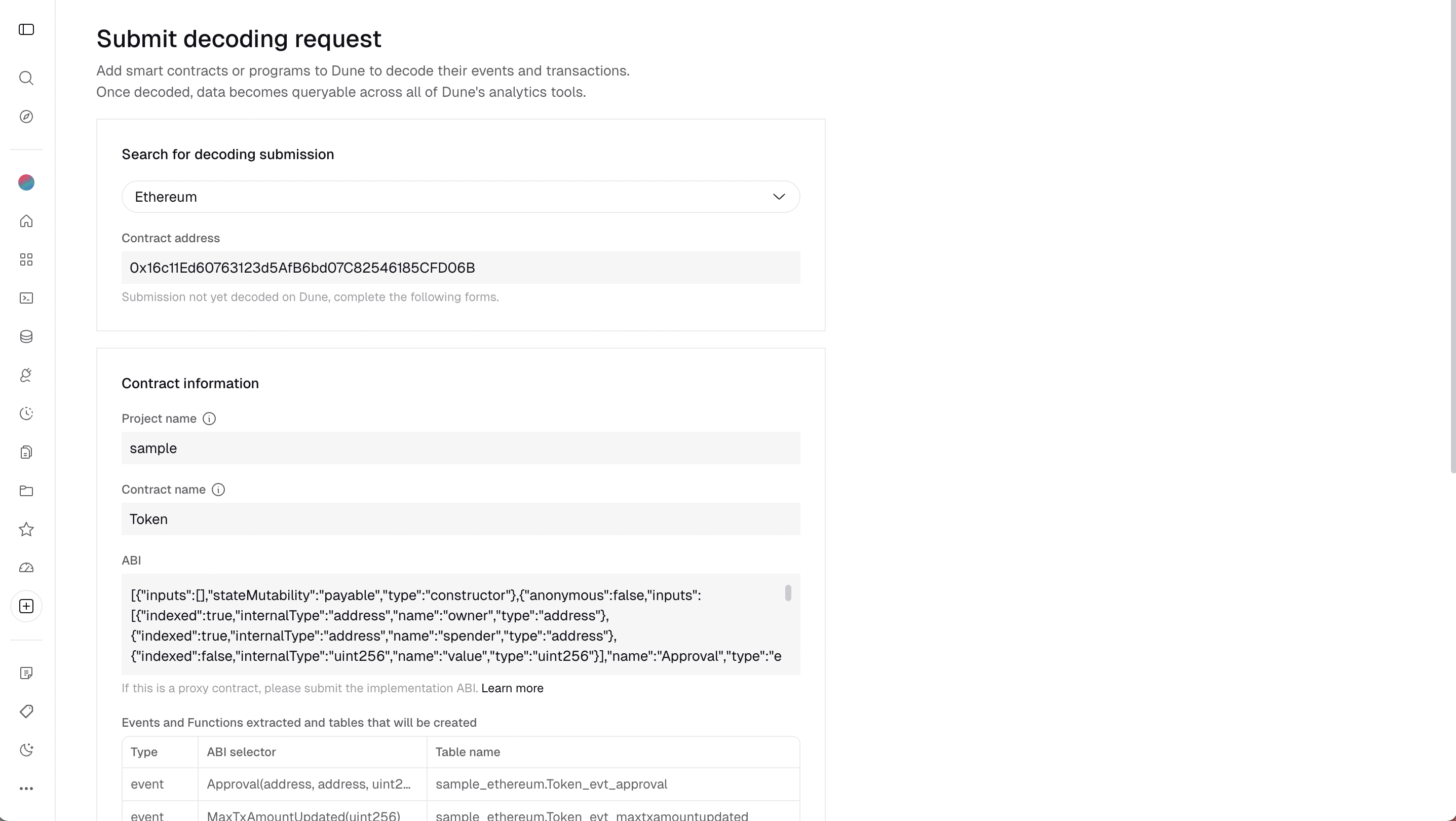 To successfully submit a contract, you will need four pieces of information:
1. **Blockchain**: Blockchain the contract is deployed on
2. **Contract Address**: The address of the contract you want to decode
3. **Project Name**: The name of the project that the contract originates from (e.g. Tether, Uniswap, Bancor)
4. **Contract Name**: The name of the smart contract as given by the project (ex. USDT, Pair, LiquidityFactory)
5. **ABI**: Unique to each smart contract. Further details can be found [here](https://docs.soliditylang.org/en/latest/abi-spec.html). Note that for contracts that are verified by a chain's explorer we will attempt to auto-fetch the ABI. Otherwise the ABI will need to be entered manually.
In most cases, the contract name will be pulled directly from a blockchain scanner. We recommend using the name provided. If the name is not automatically provided, please follow our naming conventions to assure the contract is properly assimilated into Dune's database.
### When do you need Several Instances Options?
#### Enable bytecode matching
Contract "instances" are contracts on the same chain with the same bytecode (and therefore the same ABI) for **the same project**. If you check this box, Dune can decode all instances of this project on the given blockchain with the same bytecode and ABI, consolidating them into the same tables under one `namespace.project` directory without multiple submissions.
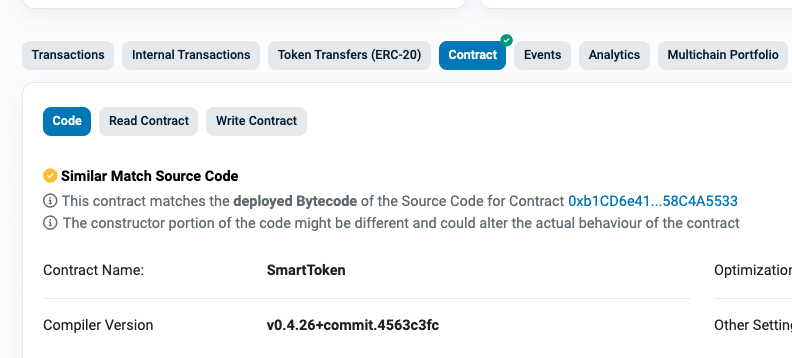
To check for other instances of the contract, go to a blockchain explorer and look for "Similar Match Source Code" under the Contract tab. Here is [an example](https://etherscan.io/address/0x58a70c59cb1f0e30c3d7ad84b96170221cbf322f#code):
To successfully submit a contract, you will need four pieces of information:
1. **Blockchain**: Blockchain the contract is deployed on
2. **Contract Address**: The address of the contract you want to decode
3. **Project Name**: The name of the project that the contract originates from (e.g. Tether, Uniswap, Bancor)
4. **Contract Name**: The name of the smart contract as given by the project (ex. USDT, Pair, LiquidityFactory)
5. **ABI**: Unique to each smart contract. Further details can be found [here](https://docs.soliditylang.org/en/latest/abi-spec.html). Note that for contracts that are verified by a chain's explorer we will attempt to auto-fetch the ABI. Otherwise the ABI will need to be entered manually.
In most cases, the contract name will be pulled directly from a blockchain scanner. We recommend using the name provided. If the name is not automatically provided, please follow our naming conventions to assure the contract is properly assimilated into Dune's database.
### When do you need Several Instances Options?
#### Enable bytecode matching
Contract "instances" are contracts on the same chain with the same bytecode (and therefore the same ABI) for **the same project**. If you check this box, Dune can decode all instances of this project on the given blockchain with the same bytecode and ABI, consolidating them into the same tables under one `namespace.project` directory without multiple submissions.
To check for other instances of the contract, go to a blockchain explorer and look for "Similar Match Source Code" under the Contract tab. Here is [an example](https://etherscan.io/address/0x58a70c59cb1f0e30c3d7ad84b96170221cbf322f#code):
 **Decoded via dynamic contract detection**
Contracts decoded this way are referred to as dynamically decoded by Dune. These are contracts that are decoded automatically because users checked the box "Are there several instances of this contract?" when submitting the contract. Note that Dune only considers a contract a dynamic instance if the bytecode matches 100%. This is done by querying the `_creation_traces` table and matching the `code` field. If the bytecode does not match 100%, we will not decode that instance.
For example, [this contract](https://arbiscan.io/address/0x999946a4f40fd2c82d66a68edfefa8430f206c9c#code) is nearly identical to [this other contract](https://arbiscan.io/address/0x692e92da68f9b8445a167b985ee0cb38c3bbe594#code) in terms of bytecode, but Dune currently does not dynamically decode the first contract because we currently require a 100% bytecode match.
#### Decode other contracts created by the same factory
A [factory contract](https://betterprogramming.pub/learn-solidity-the-factory-pattern-75d11c3e7d29) is a smart contract that creates other smart contracts. If there are multiple instances of a contract, it might be due to a factory contract. If you check this box, Dune can decode all contracts created by the same factory that use the same ABI, consolidating them into the same tables under one `namespace.project` directory (e.g., [Pair contract from Uniswap V2](https://dune.com/queries?category=decoded_project\&blockchain=ethereum\&namespace=uniswap_v2\&contract=Pair\&blockchains=ethereum)).
When you submit a contract as a factory contract, Dune verifies it by checking if the deployer (`from` address) is a contract and not an EOA. This is done by querying the `_creation_traces` table. If the `from` address is a contract, Dune will gather all `address` fields created by it for decoding.
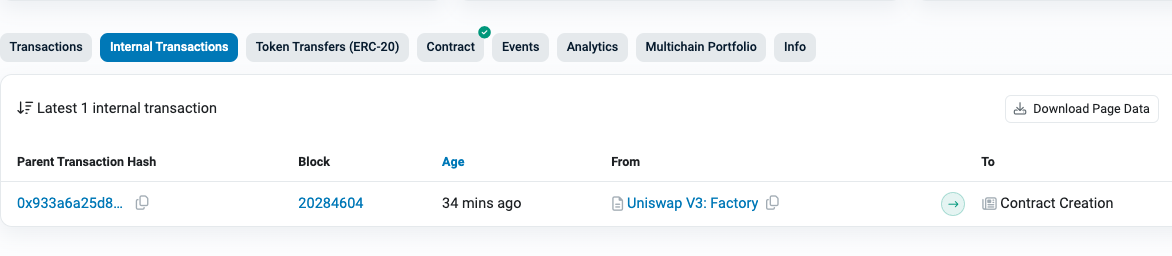
To check if a contract is created by a factory, use a blockchain explorer to see if the "From" address in a Contract Creation transaction is a contract or an EOA. For example, this is [a factory-created contract](https://etherscan.io/address/0x5d5ce36e0b328a48539b48d4f22c31f0fe3dc040#internaltx) by [Uniswap V3 factory](https://etherscan.io/address/0x1f98431c8ad98523631ae4a59f267346ea31f984).
**Decoded via dynamic contract detection**
Contracts decoded this way are referred to as dynamically decoded by Dune. These are contracts that are decoded automatically because users checked the box "Are there several instances of this contract?" when submitting the contract. Note that Dune only considers a contract a dynamic instance if the bytecode matches 100%. This is done by querying the `_creation_traces` table and matching the `code` field. If the bytecode does not match 100%, we will not decode that instance.
For example, [this contract](https://arbiscan.io/address/0x999946a4f40fd2c82d66a68edfefa8430f206c9c#code) is nearly identical to [this other contract](https://arbiscan.io/address/0x692e92da68f9b8445a167b985ee0cb38c3bbe594#code) in terms of bytecode, but Dune currently does not dynamically decode the first contract because we currently require a 100% bytecode match.
#### Decode other contracts created by the same factory
A [factory contract](https://betterprogramming.pub/learn-solidity-the-factory-pattern-75d11c3e7d29) is a smart contract that creates other smart contracts. If there are multiple instances of a contract, it might be due to a factory contract. If you check this box, Dune can decode all contracts created by the same factory that use the same ABI, consolidating them into the same tables under one `namespace.project` directory (e.g., [Pair contract from Uniswap V2](https://dune.com/queries?category=decoded_project\&blockchain=ethereum\&namespace=uniswap_v2\&contract=Pair\&blockchains=ethereum)).
When you submit a contract as a factory contract, Dune verifies it by checking if the deployer (`from` address) is a contract and not an EOA. This is done by querying the `_creation_traces` table. If the `from` address is a contract, Dune will gather all `address` fields created by it for decoding.
To check if a contract is created by a factory, use a blockchain explorer to see if the "From" address in a Contract Creation transaction is a contract or an EOA. For example, this is [a factory-created contract](https://etherscan.io/address/0x5d5ce36e0b328a48539b48d4f22c31f0fe3dc040#internaltx) by [Uniswap V3 factory](https://etherscan.io/address/0x1f98431c8ad98523631ae4a59f267346ea31f984).
 **Decoded via the factory pattern**
Contracts decoded this way are referred to as factory decoded by Dune. These contracts are automatically decoded because users checked "Is it created by a factory contract?" when submitting. Dune detects this by querying the `_creation_traces` table and fetching all `address` fields created by the same `from`.
#### Dynamic vs Factory Decoded
Dynamic decoding anchors on the bytecode being the same, while factory decoding also requires the contract to be deployed by another contract (not an EOA) with the same deployer address.
**Dynamically Decoded Contracts** share the same bytecode but may have different deployers.
For example, [this contract](https://etherscan.io/address/0x58a70c59cb1f0e30c3d7ad84b96170221cbf322f) can be decoded as dynamic because it has the same bytecode as [this contract](https://etherscan.io/address/0x6d396aaff9f438e2f86979d8367cd9deb364b16f). Both will appear under the same decoded tables in the [SmartTokens for Bancor](https://dune.com/queries?category=decoded_project\&blockchain=ethereum\&namespace=bancor\&contract=SmartToken\&blockchains=ethereum) directory but have different deployers (`from` address).
**Factory Decoded Contracts** are deployed by a factory contract and share the same deployer address.
For example, contracts created by the [Uniswap V3 Factory](https://etherscan.io/address/0x1f98431c8ad98523631ae4a59f267346ea31f984), such as [this one](https://etherscan.io/address/0xb5925e4c1912e3999891f0e71bd3d9b5492d1486#internaltx) and [this one](https://etherscan.io/address/0x5d5ce36e0b328a48539b48d4f22c31f0fe3dc040#internaltx), are factory decoded because they share the same bytecode and deployer. These contracts will appear under the same decoded tables in the [Pair for Uniswap V3](https://dune.com/queries?category=decoded_project\&blockchain=ethereum\&namespace=uniswap_v3\&contract=Pair\&blockchains=ethereum) directory.
### Other Special Contracts
Other special smart contracts can be decoded as well, following these conventions:
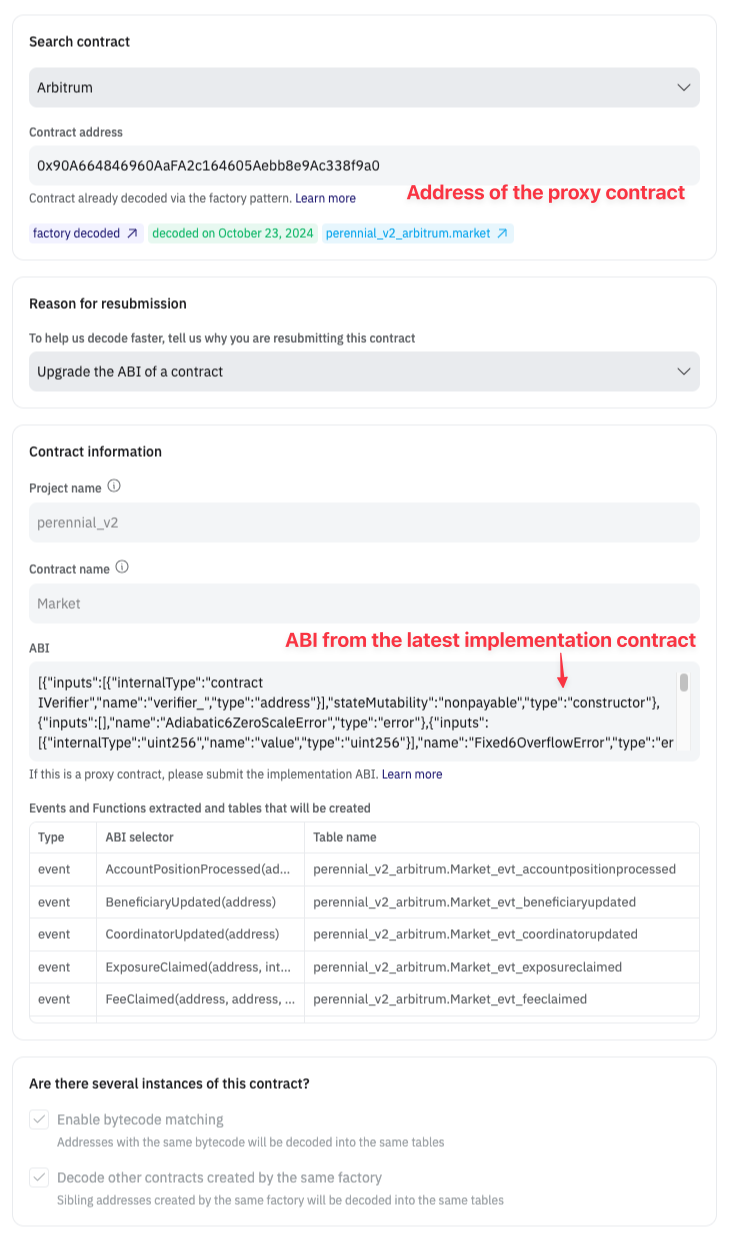
#### [Proxy contract](https://info.etherscan.com/what-is-proxy-contract/)
Submit using the proxy address but with the ABI of the implementation.
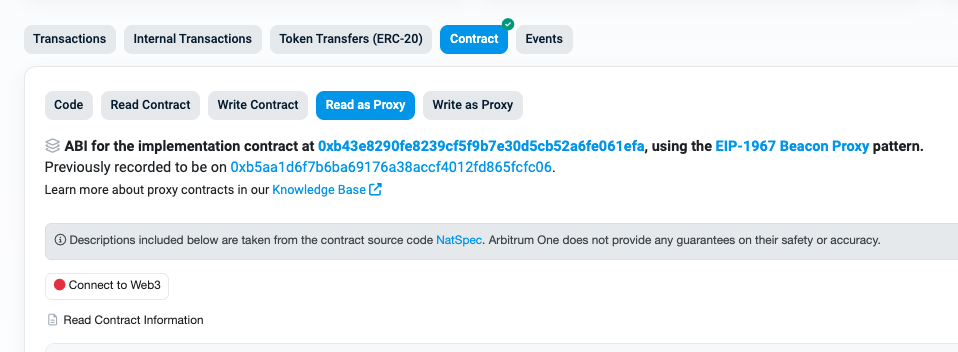
You can identify a proxy contract by looking for the "Read as Proxy" tab on a blockchain explorer. This tab will also show the implementation contract. Here is [an example](https://arbiscan.io/address/0x90a664846960aafa2c164605aebb8e9ac338f9a0#readProxyContract).
**Decoded via the factory pattern**
Contracts decoded this way are referred to as factory decoded by Dune. These contracts are automatically decoded because users checked "Is it created by a factory contract?" when submitting. Dune detects this by querying the `_creation_traces` table and fetching all `address` fields created by the same `from`.
#### Dynamic vs Factory Decoded
Dynamic decoding anchors on the bytecode being the same, while factory decoding also requires the contract to be deployed by another contract (not an EOA) with the same deployer address.
**Dynamically Decoded Contracts** share the same bytecode but may have different deployers.
For example, [this contract](https://etherscan.io/address/0x58a70c59cb1f0e30c3d7ad84b96170221cbf322f) can be decoded as dynamic because it has the same bytecode as [this contract](https://etherscan.io/address/0x6d396aaff9f438e2f86979d8367cd9deb364b16f). Both will appear under the same decoded tables in the [SmartTokens for Bancor](https://dune.com/queries?category=decoded_project\&blockchain=ethereum\&namespace=bancor\&contract=SmartToken\&blockchains=ethereum) directory but have different deployers (`from` address).
**Factory Decoded Contracts** are deployed by a factory contract and share the same deployer address.
For example, contracts created by the [Uniswap V3 Factory](https://etherscan.io/address/0x1f98431c8ad98523631ae4a59f267346ea31f984), such as [this one](https://etherscan.io/address/0xb5925e4c1912e3999891f0e71bd3d9b5492d1486#internaltx) and [this one](https://etherscan.io/address/0x5d5ce36e0b328a48539b48d4f22c31f0fe3dc040#internaltx), are factory decoded because they share the same bytecode and deployer. These contracts will appear under the same decoded tables in the [Pair for Uniswap V3](https://dune.com/queries?category=decoded_project\&blockchain=ethereum\&namespace=uniswap_v3\&contract=Pair\&blockchains=ethereum) directory.
### Other Special Contracts
Other special smart contracts can be decoded as well, following these conventions:
#### [Proxy contract](https://info.etherscan.com/what-is-proxy-contract/)
Submit using the proxy address but with the ABI of the implementation.
You can identify a proxy contract by looking for the "Read as Proxy" tab on a blockchain explorer. This tab will also show the implementation contract. Here is [an example](https://arbiscan.io/address/0x90a664846960aafa2c164605aebb8e9ac338f9a0#readProxyContract).
 To decode:
1. Use the address of the [proxy contract](https://arbiscan.io/address/0x90a664846960aafa2c164605aebb8e9ac338f9a0).
2. Fetch the ABI of the [implementation contract](https://arbiscan.io/address/0x90a664846960aafa2c164605aebb8e9ac338f9a0#readProxyContract).
To decode:
1. Use the address of the [proxy contract](https://arbiscan.io/address/0x90a664846960aafa2c164605aebb8e9ac338f9a0).
2. Fetch the ABI of the [implementation contract](https://arbiscan.io/address/0x90a664846960aafa2c164605aebb8e9ac338f9a0#readProxyContract).
 #### Diamond proxy contracts
Submit all the facets using just the same name for the project and contract and upload all the relevant ABIs. This can be done with one ABI representing all facets or separate ABIs for each facet.
**Where can I find this information?**
Contract addresses can usually be found in a project's docs. Once you have the contract address, you can use a blockchain explorer to get the rest of the information. Most blockchain explorers have everything you need!
### Resubmissions
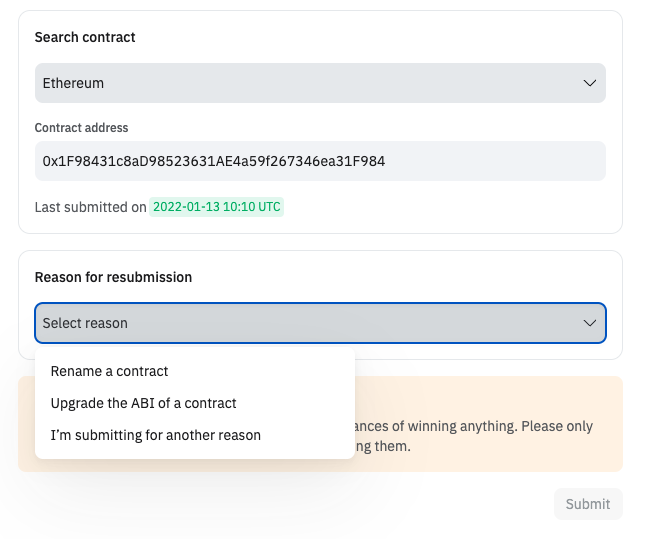
Sometimes you need to resubmit a contract because the name is originally submitted wrong, or you need to update the ABI. Follow the steps as guided. But if you are resubmitting for other reason not listed in the dropdown, provide as much detail as possible to avoid the resubmission being rejected.
#### Diamond proxy contracts
Submit all the facets using just the same name for the project and contract and upload all the relevant ABIs. This can be done with one ABI representing all facets or separate ABIs for each facet.
**Where can I find this information?**
Contract addresses can usually be found in a project's docs. Once you have the contract address, you can use a blockchain explorer to get the rest of the information. Most blockchain explorers have everything you need!
### Resubmissions
Sometimes you need to resubmit a contract because the name is originally submitted wrong, or you need to update the ABI. Follow the steps as guided. But if you are resubmitting for other reason not listed in the dropdown, provide as much detail as possible to avoid the resubmission being rejected.
 ## Step 2: Decoding
Once the contract has been approved for decoding, you will receive a notification in your email. While the table itself may be visible after approval, it may be empty. No reason to worry! Note that it takes around 24 hours from the time the contract has been approved to be fully decoded and incorporated into the Dune database.
At any point you can check the status of your submitted contract under "Contracts" in your settings.
## Step 3: Finding Your Decoded Contract
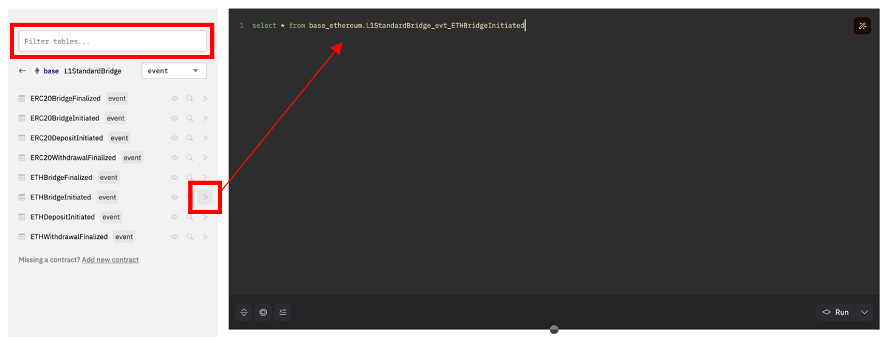
One quick tip to find and begin querying your decoded table is to use Dune's Explorer. When beginning a new query, the Explorer is located to the left side of the Query Editor. From there, follow simple steps:
1. Drop the contract address of your decoded contract in the search bar
2. Pull up the specific function or event you are looking for
3. use the **>>** button to immediately populate that table in your Query Editor.
## Step 2: Decoding
Once the contract has been approved for decoding, you will receive a notification in your email. While the table itself may be visible after approval, it may be empty. No reason to worry! Note that it takes around 24 hours from the time the contract has been approved to be fully decoded and incorporated into the Dune database.
At any point you can check the status of your submitted contract under "Contracts" in your settings.
## Step 3: Finding Your Decoded Contract
One quick tip to find and begin querying your decoded table is to use Dune's Explorer. When beginning a new query, the Explorer is located to the left side of the Query Editor. From there, follow simple steps:
1. Drop the contract address of your decoded contract in the search bar
2. Pull up the specific function or event you are looking for
3. use the **>>** button to immediately populate that table in your Query Editor.
 Then it's all ready for you to query. Let the data flow!
# B. Need Help?
For frequently asked questions about decoding contracts, check out our [Decoding FAQs](/web-app/decoding/faqs).
### Additional Questions?
Head over to the [#decoding Discord channel](https://discord.com/channels/757637422384283659/850326962152538122) and we'll be happy to help!
Then it's all ready for you to query. Let the data flow!
# B. Need Help?
For frequently asked questions about decoding contracts, check out our [Decoding FAQs](/web-app/decoding/faqs).
### Additional Questions?
Head over to the [#decoding Discord channel](https://discord.com/channels/757637422384283659/850326962152538122) and we'll be happy to help!