> ## Documentation Index
> Fetch the complete documentation index at: https://docs.dune.com/llms.txt
> Use this file to discover all available pages before exploring further.
# EVM Decoding Functions
> Functions to decode raw EVM events and function calls in DuneSQL.
EVM decoding functions let you decode raw event logs and function call traces inline in DuneSQL using a contract's ABI. This is useful when you need to decode contracts that have not been submitted through Dune's [contract decoding pipeline](/web-app/decoding/decoding-contracts), or when you want to decode data ad hoc without waiting for a submission to be processed.
Live examples of both functions applied to real contract data.
## Before You Start
### Finding a Contract's ABI
These functions require the ABI for a **single event or function**, not the entire contract ABI.
To find the ABI for a specific event or function:
1. Go to the contract's page on [Etherscan](https://etherscan.io) (or the relevant chain's block explorer).
2. Navigate to **Contract > Code > Contract ABI**.
3. Locate the JSON object for the specific event or function you want to decode.
4. Copy that single JSON object, not the full array.
Pass only the ABI for the specific event or function, not the entire contract ABI. Each `decode_evm_event()` or `decode_evm_function_call()` invocation expects a single ABI entry.
For more details on what an ABI is, see [this guide](https://www.quicknode.com/guides/ethereum-development/smart-contracts/what-is-an-abi).
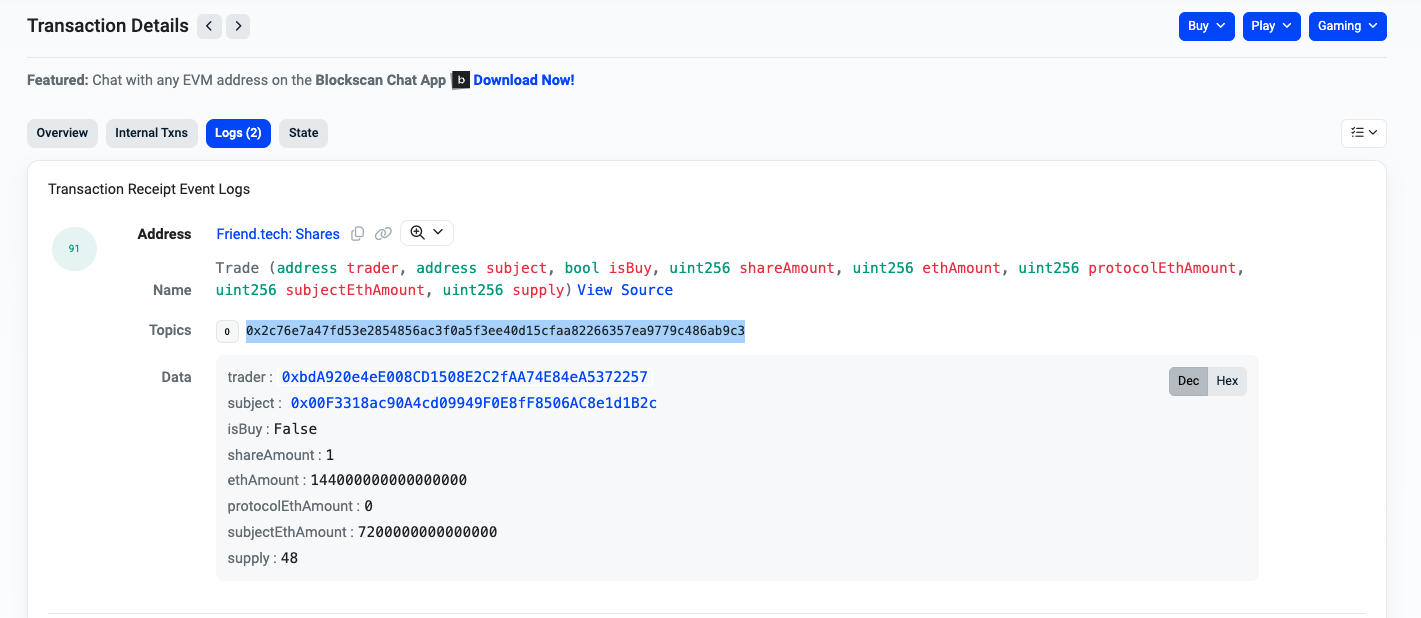
### Finding the topic0 for an Event
`topic0` is the keccak256 hash of the event signature (name and parameter types). Use it to filter `logs` tables for specific events.
To find a `topic0`:
1. Open an [example transaction](https://basescan.org/tx/0x446c2c7c605cde83d6aba87921fceec40b111b97166ddbee513424eefae31ba5#eventlog) on a block explorer.
2. Go to the **Logs** tab.
3. Identify the event and copy the value in the **topic0** field.
 ### Finding the MethodId for a Function Call
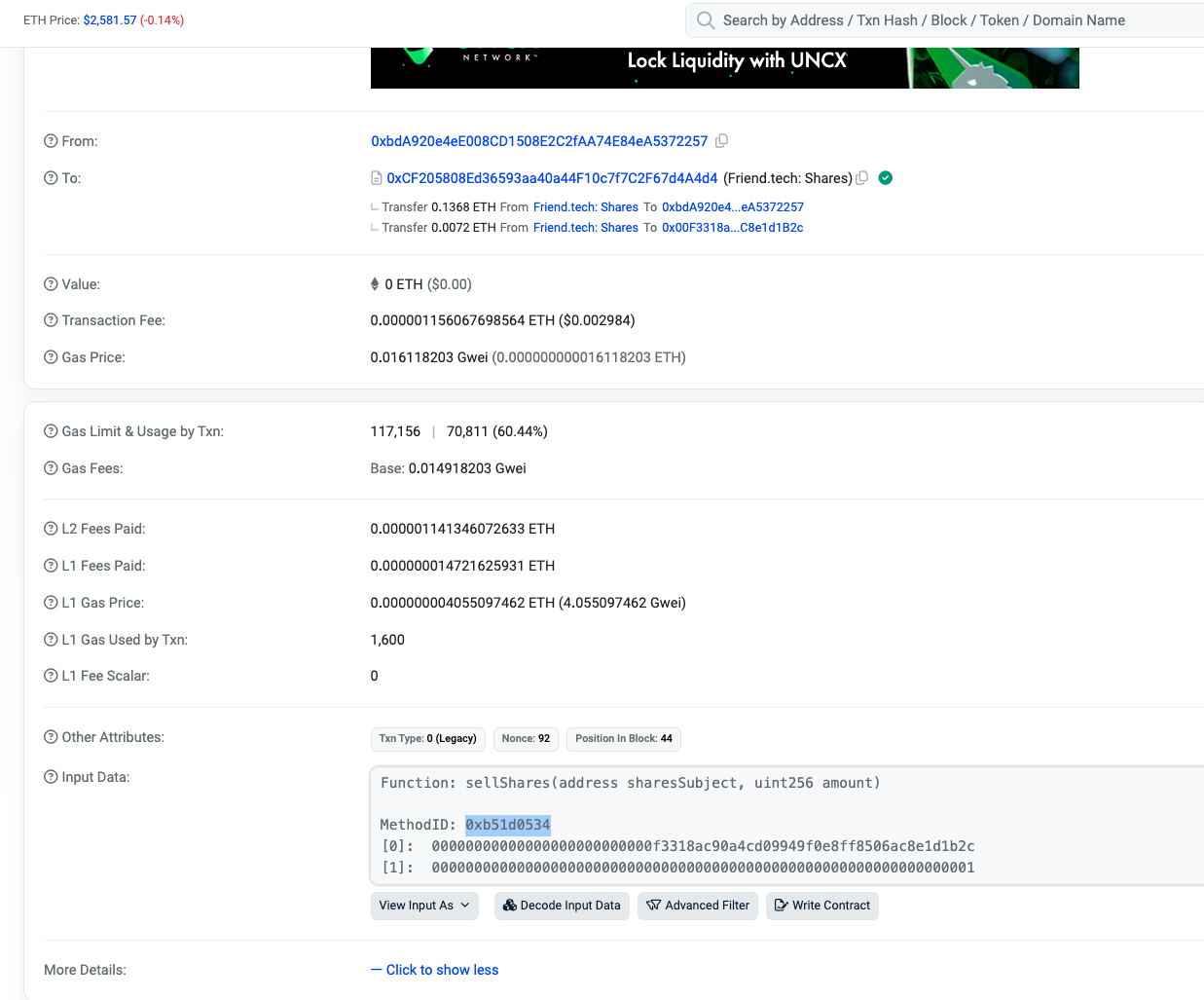
The MethodId is the first 4 bytes of the keccak256 hash of the function signature. Use it with `starts_with(input, )` to filter `traces` tables for specific function calls.
To find a MethodId:
1. Open an [example transaction](https://basescan.org/tx/0x446c2c7c605cde83d6aba87921fceec40b111b97166ddbee513424eefae31ba5) on a block explorer.
2. In the **Overview** tab, click **Click to show more**.
3. Copy the **MethodId** from the Input Data field.
### Finding the MethodId for a Function Call
The MethodId is the first 4 bytes of the keccak256 hash of the function signature. Use it with `starts_with(input, )` to filter `traces` tables for specific function calls.
To find a MethodId:
1. Open an [example transaction](https://basescan.org/tx/0x446c2c7c605cde83d6aba87921fceec40b111b97166ddbee513424eefae31ba5) on a block explorer.
2. In the **Overview** tab, click **Click to show more**.
3. Copy the **MethodId** from the Input Data field.
 ## Function Reference
### decode\_evm\_event()
**`decode_evm_event(abi, input [, topics [, data [, null_on_error]]])`**
Decodes EVM events according to the provided ABI. Returns each decoded parameter as a separate column.
#### Arguments
| Argument | Required | Type | Default | Description |
| --------------- | -------- | ---------- | -------------------------------------------- | ------------------------------------------------------------------------------------------------------------------------ |
| `abi` | Yes | varchar | | Event specification in JSON format. Must be constant at analysis time. Each input in the ABI produces one output column. |
| `input` | Yes | table | | Table or subquery providing `topics` and `data` columns. Must be preceded with the `TABLE` keyword. |
| `topics` | No | descriptor | `DESCRIPTOR(topic0, topic1, topic2, topic3)` | Specifies which columns contain the event topics. Null topics are ignored. |
| `data` | No | descriptor | `DESCRIPTOR(data)` | Specifies which column contains the event data. |
| `null_on_error` | No | boolean | `true` | When `true`, decoding errors produce null values. When `false`, errors are raised. |
#### Output
One column per parameter defined in the ABI inputs. Column names match the ABI parameter names, or default to `_arg0`, `_arg1`, etc. Columns are ordered with `indexed` inputs first.
All columns from the input table are passed through. The returned table contains one column for each ABI argument, followed by all columns from the input table.
#### Examples
* [Basic Usage](https://dune.com/queries/3851471)
```sql theme={null}
SELECT *
FROM TABLE (
decode_evm_event (
abi => '{"anonymous":false,"inputs":[{"indexed":true,"internalType":"address","name":"buyer","type":"address"},{"indexed":true,"internalType":"address","name":"recipient","type":"address"},{"indexed":false,"internalType":"uint256[]","name":"tokensSoldIds","type":"uint256[]"},{"indexed":false,"internalType":"uint256[]","name":"tokensSoldAmounts","type":"uint256[]"},{"indexed":false,"internalType":"uint256[]","name":"currencyBoughtAmounts","type":"uint256[]"},{"indexed":false,"internalType":"address[]","name":"extraFeeRecipients","type":"address[]"},{"indexed":false,"internalType":"uint256[]","name":"extraFeeAmounts","type":"uint256[]"}],"name":"CurrencyPurchase","type":"event"}',
input => TABLE (
SELECT *
FROM polygon.logs
WHERE topic0 = 0xb57378559821141c0e7ae964206b7523234d19e5783ade99b3d665eee495c997
LIMIT 20
)
)
)
```
* [Using Custom Topics and Data Columns](https://dune.com/queries/3861622)
```sql theme={null}
SELECT *
FROM TABLE (
decode_evm_event (
abi => '{"anonymous":false,"inputs":[{"indexed":true,"internalType":"address","name":"buyer","type":"address"},{"indexed":true,"internalType":"address","name":"recipient","type":"address"},{"indexed":false,"internalType":"uint256[]","name":"tokensSoldIds","type":"uint256[]"},{"indexed":false,"internalType":"uint256[]","name":"tokensSoldAmounts","type":"uint256[]"},{"indexed":false,"internalType":"uint256[]","name":"currencyBoughtAmounts","type":"uint256[]"},{"indexed":false,"internalType":"address[]","name":"extraFeeRecipients","type":"address[]"},{"indexed":false,"internalType":"uint256[]","name":"extraFeeAmounts","type":"uint256[]"}],"name":"CurrencyPurchase","type":"event"}',
input => TABLE (
SELECT topic0 as my_topic_0, topic1 as my_topic_1, topic2 as my_last_topic, data as my_data_column, *
FROM polygon.logs
WHERE topic0 = 0xb57378559821141c0e7ae964206b7523234d19e5783ade99b3d665eee495c997
LIMIT 20
),
topics => DESCRIPTOR(my_topic_0, my_topic_1, my_last_topic),
data => DESCRIPTOR(my_data_column),
null_on_error => false
)
)
```
### decode\_evm\_function\_call()
**`decode_evm_function_call(abi, data [, input [, output [, null_on_error]]])`**
Decodes EVM function calls according to the provided ABI. Returns each decoded input and output parameter as separate columns.
#### Arguments
| Argument | Required | Type | Default | Description |
| --------------- | -------- | ---------- | -------------------- | ------------------------------------------------------------------------------------------------------------------------------------------- |
| `abi` | Yes | varchar | | Function call specification in JSON format. Must be constant at analysis time. Each input and output in the ABI produces one output column. |
| `data` | Yes | table | | Table or subquery providing `input` and `output` columns. Must be preceded with the `TABLE` keyword. |
| `input` | No | descriptor | `DESCRIPTOR(input)` | Specifies which column contains the function call input bytes. |
| `output` | No | descriptor | `DESCRIPTOR(output)` | Specifies which column contains the function call output bytes. |
| `null_on_error` | No | boolean | `true` | When `true`, decoding errors produce null values. When `false`, errors are raised. |
#### Output
One column per input and output defined in the ABI. Column names match the ABI parameter names, or default to `_input0`, `_input1`, `_output0`, `_output1`, etc. If two arguments share the same name, the last declared argument takes precedence.
All columns from the data table are passed through. The returned table contains one column for each ABI argument, followed by all columns from the data table.
#### Examples
* [Basic Usage](https://dune.com/queries/4001654)
```sql theme={null}
SELECT *
FROM TABLE (
decode_evm_function_call (
abi => '{"name":"getPlanet","type":"function","inputs":[{"name":"planetId","type":"uint256"}],"outputs":[{"name":"planetName","type":"string"},{"name":"planetType","type":"string"}]}',
data => TABLE (
SELECT *
FROM polygon.traces
WHERE starts_with(input, 0x34efcb8e)
LIMIT 20
)
)
)
```
## Function Reference
### decode\_evm\_event()
**`decode_evm_event(abi, input [, topics [, data [, null_on_error]]])`**
Decodes EVM events according to the provided ABI. Returns each decoded parameter as a separate column.
#### Arguments
| Argument | Required | Type | Default | Description |
| --------------- | -------- | ---------- | -------------------------------------------- | ------------------------------------------------------------------------------------------------------------------------ |
| `abi` | Yes | varchar | | Event specification in JSON format. Must be constant at analysis time. Each input in the ABI produces one output column. |
| `input` | Yes | table | | Table or subquery providing `topics` and `data` columns. Must be preceded with the `TABLE` keyword. |
| `topics` | No | descriptor | `DESCRIPTOR(topic0, topic1, topic2, topic3)` | Specifies which columns contain the event topics. Null topics are ignored. |
| `data` | No | descriptor | `DESCRIPTOR(data)` | Specifies which column contains the event data. |
| `null_on_error` | No | boolean | `true` | When `true`, decoding errors produce null values. When `false`, errors are raised. |
#### Output
One column per parameter defined in the ABI inputs. Column names match the ABI parameter names, or default to `_arg0`, `_arg1`, etc. Columns are ordered with `indexed` inputs first.
All columns from the input table are passed through. The returned table contains one column for each ABI argument, followed by all columns from the input table.
#### Examples
* [Basic Usage](https://dune.com/queries/3851471)
```sql theme={null}
SELECT *
FROM TABLE (
decode_evm_event (
abi => '{"anonymous":false,"inputs":[{"indexed":true,"internalType":"address","name":"buyer","type":"address"},{"indexed":true,"internalType":"address","name":"recipient","type":"address"},{"indexed":false,"internalType":"uint256[]","name":"tokensSoldIds","type":"uint256[]"},{"indexed":false,"internalType":"uint256[]","name":"tokensSoldAmounts","type":"uint256[]"},{"indexed":false,"internalType":"uint256[]","name":"currencyBoughtAmounts","type":"uint256[]"},{"indexed":false,"internalType":"address[]","name":"extraFeeRecipients","type":"address[]"},{"indexed":false,"internalType":"uint256[]","name":"extraFeeAmounts","type":"uint256[]"}],"name":"CurrencyPurchase","type":"event"}',
input => TABLE (
SELECT *
FROM polygon.logs
WHERE topic0 = 0xb57378559821141c0e7ae964206b7523234d19e5783ade99b3d665eee495c997
LIMIT 20
)
)
)
```
* [Using Custom Topics and Data Columns](https://dune.com/queries/3861622)
```sql theme={null}
SELECT *
FROM TABLE (
decode_evm_event (
abi => '{"anonymous":false,"inputs":[{"indexed":true,"internalType":"address","name":"buyer","type":"address"},{"indexed":true,"internalType":"address","name":"recipient","type":"address"},{"indexed":false,"internalType":"uint256[]","name":"tokensSoldIds","type":"uint256[]"},{"indexed":false,"internalType":"uint256[]","name":"tokensSoldAmounts","type":"uint256[]"},{"indexed":false,"internalType":"uint256[]","name":"currencyBoughtAmounts","type":"uint256[]"},{"indexed":false,"internalType":"address[]","name":"extraFeeRecipients","type":"address[]"},{"indexed":false,"internalType":"uint256[]","name":"extraFeeAmounts","type":"uint256[]"}],"name":"CurrencyPurchase","type":"event"}',
input => TABLE (
SELECT topic0 as my_topic_0, topic1 as my_topic_1, topic2 as my_last_topic, data as my_data_column, *
FROM polygon.logs
WHERE topic0 = 0xb57378559821141c0e7ae964206b7523234d19e5783ade99b3d665eee495c997
LIMIT 20
),
topics => DESCRIPTOR(my_topic_0, my_topic_1, my_last_topic),
data => DESCRIPTOR(my_data_column),
null_on_error => false
)
)
```
### decode\_evm\_function\_call()
**`decode_evm_function_call(abi, data [, input [, output [, null_on_error]]])`**
Decodes EVM function calls according to the provided ABI. Returns each decoded input and output parameter as separate columns.
#### Arguments
| Argument | Required | Type | Default | Description |
| --------------- | -------- | ---------- | -------------------- | ------------------------------------------------------------------------------------------------------------------------------------------- |
| `abi` | Yes | varchar | | Function call specification in JSON format. Must be constant at analysis time. Each input and output in the ABI produces one output column. |
| `data` | Yes | table | | Table or subquery providing `input` and `output` columns. Must be preceded with the `TABLE` keyword. |
| `input` | No | descriptor | `DESCRIPTOR(input)` | Specifies which column contains the function call input bytes. |
| `output` | No | descriptor | `DESCRIPTOR(output)` | Specifies which column contains the function call output bytes. |
| `null_on_error` | No | boolean | `true` | When `true`, decoding errors produce null values. When `false`, errors are raised. |
#### Output
One column per input and output defined in the ABI. Column names match the ABI parameter names, or default to `_input0`, `_input1`, `_output0`, `_output1`, etc. If two arguments share the same name, the last declared argument takes precedence.
All columns from the data table are passed through. The returned table contains one column for each ABI argument, followed by all columns from the data table.
#### Examples
* [Basic Usage](https://dune.com/queries/4001654)
```sql theme={null}
SELECT *
FROM TABLE (
decode_evm_function_call (
abi => '{"name":"getPlanet","type":"function","inputs":[{"name":"planetId","type":"uint256"}],"outputs":[{"name":"planetName","type":"string"},{"name":"planetType","type":"string"}]}',
data => TABLE (
SELECT *
FROM polygon.traces
WHERE starts_with(input, 0x34efcb8e)
LIMIT 20
)
)
)
```